
Before you start studying jQuery, you should have a basic knowledge of:
You can use jQuery library online
or from your hard drive by including in the header section on your web page.
To use jQuery from Google, use one of the following:
Google CDN:
<head>
<script src="//ajax.googleapis.com/ajax/libs/jquery/1.9.1/jquery.min.js">
</script>
</head>
</pre>
The jQuery library contains the following features:
- HTML/DOM manipulation
- CSS manipulation
- HTML event methods
- Effects and animations
- AJAX
- Utilities
jQuery Syntax
The jQuery syntax selects HTML elements and perform action on the element(s).
Basic syntax is: $(selector).action()
$ sign is used to define the jQuery
selector is the id of HTML element
action() is the action to be performed on element(s)
Examples:
$(this).hide() - hides the current element.
$("top").hide() - hides all elements of class="top"
$("p").hide() - hides all <p> elements.
$("#px").hide() - hides the element with id="px".
The element Selector
The jQuery element selector selects elements based on the element name.
You can select all <p> elements on a page with
$("p")
When a you click on a button, all <p> elements will be hidden:
$(document).ready(function(){
$("button").click(function(){
$("p").hide();
});
});
The #id Selector
The #id selector finds a specific element with #id
$("#test")
When a user clicks on #test, it gets hidden
$(document).ready(function(){
$("#test").click(function(){
$("#test").hide();
});
});
The .class Selector
$(".test")
$("*") Selects all elements
$(this) Selects the current HTML element
$("p.ix") Selects all <p> elements with class="ix"
$("p:first") Selects the first <p> element
$("ul li:first") Selects the first <li> element of first <ul>
$("ul li:first-child") Selects the first <li> element of every <ul>
$("[href]") Selects all elements with an href attribute
$("a[target='_blank']") Selects all <a> elements with a target attribute value equal to "_blank"
$("a[target!='_blank']") Selects all <a> elements with a target attribute value NOT equal to "_blank"
$(":button") Selects all <button> elements and <input> elements of type="button"
$("tr:even") Selects all even <tr> elements
$("tr:odd") Selects all odd <tr> elements
jQereyEvents
An event represents the precise moment when something happens.
Mouse Events
click, dblclick, mouseenter, mouseleave
Keyboard Events
keypress, keydown, keyup
Form Events
submit, change, focus, blur
Document/Window Events
load, resize, scroll, unload
Query Syntax For Event Methods
To assign a click event to all <p>s
$("p").click();
The next step is to define what should happen when the event fires. You must pass a function to the event:
$("p").click(function(){
// action goes here!!
});
Common Events
//--------------------click event
$("p").click(function(){
$(this).hide();
});
//--------------------double click event
$("p").dblclick(function(){
$(this).hide();
});
//--------------------mouseenter event
$("#p1").mouseenter(function(){
alert("You entered p1!");
});
//--------------------mouseleave event
$("#p1").mouseleave(function(){
alert("Bye! You now leave p1!");
});
//--------------------mousedown event
$("#p1").mousedown(function(){
alert("Mouse down over p1!");
});
//--------------------mouseup event
$("#p1").mouseup(function(){
alert("Mouse up over p1!");
});
//--------------------hoover event
$("#p1").hover(function(){
alert("You entered p1!");
},
function(){
alert("Bye! You now leave p1!");
});
//--------------------focus event
$("input").focus(function(){
$(this).css("background-color","#cccccc");
});
//--------------------blur event
$("input").blur(function(){
$(this).css("background-color","#ffffff");
});
//-----------------------hide event
jQuery hide() and show()
With jQuery, you can hide and show HTML elements with the hide() and show() methods:
$("#hide").click(function(){
$("p").hide();
});
$("#show").click(function(){
$("p").show();
});
//-------------------- Toggle event
jQuery toggle()
$("button").click(function(){
$("p").toggle();
});
//------------------jQuery Fading Methods
fadeIn()
fadeOut()
fadeToggle()
fadeTo()
$(selector).fadeToggle(speed,callback);
$("button").click(function(){
$("#div1").fadeIn();
$("#div2").fadeIn("slow");
$("#div3").fadeIn(3000);
});
//------------------ jQuery Fading Out Methods
$("button").click(function(){
$("#div1").fadeOut();
$("#div2").fadeOut("slow");
$("#div3").fadeOut(3000);
});
//---------------------jQuery fadeToggle() Method
$("button").click(function(){
$("#div1").fadeToggle();
$("#div2").fadeToggle("slow");
$("#div3").fadeToggle(3000);
});
jQuery fadeTo() Method
$("button").click(function(){
$("#div1").fadeTo("slow",0.15);
$("#div2").fadeTo("slow",0.4);
$("#div3").fadeTo("slow",0.7);
});
jQuery Sliding Methods
slideDown()
slideUp()
slideToggle()
Syntax:
$(selector).slideDown(speed,callback);
$("#flip").click(function(){
$("#panel").slideDown();
});
$("#flip").click(function(){
$("#panel").slideUp();
});
$("#flip").click(function(){
$("#panel").slideToggle();
});
JQuery Animations
The jQuery animate() method is used to create custom animations.
Syntax:
$(selector).animate({params},speed,callback);
$("button").click(function(){
$("div").animate({left:'250px'});
});
jQuery stop() Method
stop() method is used to stop an animation or effect
$("#stop").click(function(){
$("#panel").stop();
});
//----------------jQuery Callback Functions
JavaScript statements are executed line by line.
In effects, the next line of code can be run even though the effect is not finished.
It can create errors. hence callback functions are used
$("button").click(function(){
$("p").hide("slow",function(){
alert("The paragraph is now hidden");
});
});
//---------------jQuery Method Chaining
$("#p1").css("color","red").slideUp(2000).slideDown(2000);
//--------Get Content - text(), html(), and val()
$("#btn1").click(function(){
alert("Text: " + $("#test").text());
});
$("#btn2").click(function(){
alert("HTML: " + $("#test").html());
});
//------------how to get the value of an input field
$("#btn1").click(function(){
alert("Value: " + $("#test").val());
});
//----------------how to get the value of the href attribute in a link:
$("button").click(function(){
alert($("#w42").attr("href"));
});
Callback Function for text(), html(), and val()
$("#btn1").click(function(){
$("#test1").text(function(i,origText){
return "Old text: " + origText + " New text: Hello world!
(index: " + i + ")";
});
});
$("#btn2").click(function(){
$("#test2").html(function(i,origText){
return "Old html: " + origText + " New html: Hello <b>world!</b>
(index: " + i + ")";
});
});
//------------how to change (set) the value of the href attribute in a link:
$("button").click(function(){
$("#w3s").attr("href","http://www.kapura.com/chat/");
});
//---------- how to set both the href and title attributes at the same time:
$("button").click(function(){
$("#w3s").attr({
"href" : "http://www.kaputa.com/",
"title" : "Welcome to Chat"
});
});
//--- The jQuery append() method inserts content AT THE END of the selected HTML elements.
$("p").append("Some appended text.");
//------The jQuery prepend() method inserts content AT THE BEGINNING of the selected HTML elements.
$("p").prepend("Some prepended text.");
//-----Add Several New Elements With append() and prepend()
function appendText()
{
var txt1="<p>Text.</p>"; // Create element with HTML
var txt2=$("<p></p>").text("Text."); // Create with jQuery
var txt3=document.createElement("p"); // Create with DOM
txt3.innerHTML="Text.";
$("p").append(txt1,txt2,txt3); // Append the new elements
}
//-----jQuery after() and before() Methods
$("img").after("Some text after");
$("img").before("Some text before");
function afterText()
{
var txt1="<b>I </b>"; // Create element with HTML
var txt2=$("<i></i>").text("love "); // Create with jQuery
var txt3=document.createElement("big"); // Create with DOM
txt3.innerHTML="jQuery!";
$("img").after(txt1,txt2,txt3); // Insert new elements after img
}
//----The jQuery remove() method removes the selected element(s) and its child elements.
$("#div1").remove();
//----jQuery empty() method removes the child elements of the selected element(s).
$("#div1").empty();
//---- jQuery addClass() Method
$("button").click(function(){
$("#div1").addClass("important blue");
});
//---- jQuery removeClass() Method
$("button").click(function(){
$("#div1").removeClass("important blue");
});
//-------toggleClass() Method
$("button").click(function(){
$("h1,h2,p").toggleClass("blue");
});
// read and set a CSS property
$("p").css("background-color");
$("p").css("background-color","yellow");
//multiple CSS set
$("p").css({"background-color":"yellow","font-size":"200%"});
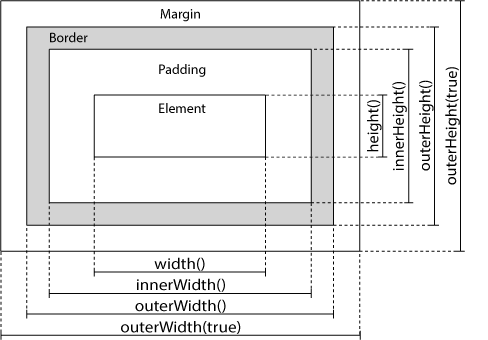
jQuery - Dimensions
width()
height()
innerWidth()
innerHeight()
outerWidth()
outerHeight()
//-------Width & Height
$("button").click(function(){
var txt="";
txt+="Width: " + $("#div1").width() + "</br>";
txt+="Height: " + $("#div1").height();
$("#div1").html(txt);
});
Outer width & Outer height
$("button").click(function(){
var txt="";
txt+="Outer width: " + $("#div1").outerWidth() + "</br>";
txt+="Outer height: " + $("#div1").outerHeight();
$("#div1").html(txt);
});
Query AJAX?
AJAX = Asynchronous JavaScript and XML.
AJAX help loading data in the background and display it on the webpage, without reloading the whole page.
jQuery - AJAX load() Method
Syntax:
$(selector).load(URL,data,callback);
$("#div1").load("demo_test.txt");
$("button").click(function(){
$("#div1").load("demo_test.txt",function(responseTxt,statusTxt,xhr){
if(statusTxt=="success")
alert("External content loaded successfully!");
if(statusTxt=="error")
alert("Error: "+xhr.status+": "+xhr.statusText);
});
});
HTTP Request: GET vs. POST
GET - Requests data from a specified resource
POST - Submits data to be processed to a specified resource
//---------------jQuery $.get() Method
$("button").click(function(){
$.get("demo_test.asp",function(data,status){
alert("Data: " + data + "\nStatus: " + status);
});
});
//---jQuery - The noConflict() Method
The noConflict() method releases the hold on the $ shortcut identifier, so that other scripts can use it.
$.noConflict();
jQuery(document).ready(function(){
jQuery("button").click(function(){
jQuery("p").text("jQuery is still working!");
});
});
Good Animation Examples
http://www.spritely.net/
http://webdev.stephband.info/parallax.html
http://buildinternet.com/live/curtains/
http://demo.marcofolio.net/jquery_dj/
http://www.ajaxblender.com/
http://pushingpixels.at/experiments/dynamic_shadow/
http://jsbin.com/emoner/2
http://www.devirtuoso.com/Examples/3D-jQuery/
Jquery Mobile
http://jquerymobile.com/

